harnsy

Your agents are already installed. Now they work as one team.

Claude Code, Codex and OpenCode send messages to each other, take roles, and pass work on when one agent’s memory window is full. You talk to one lead.You give direction to one lead agent. It plans the work, hands it out and checks it. You accept the result or send it back. Cost by project and role is a harnsy Max view.

harnsy is a developer tool. It fits code, and any other work that splits into roles. You need one coding agent (Claude Code, Codex or OpenCode) that you are already signed in to.

Three tools, and nothing between them.

You use Claude Code, Codex and OpenCode, and maybe a cheaper model for the simple jobs. Each works well alone. Between them there is only you. You copy an answer from one window and paste it into the next.

Work from many agents, and you cannot see what waits for you.

AI writes tasks faster than you can read them. You do not know which ones are stuck, which need your decision, and which are finished. To be sure of anything, you read everything yourself.

In the author’s words

I needed three different agent tools to work together: Claude, Codex and a cheaper model for labelling data, because my Claude limits ran out. They had to talk to each other directly, not leave notes in a shared chat and answer an hour later. If Claude writes to Codex, Codex sees it at once, like a message to a colleague in a chat. So I built that.

The author of harnsy— the author of harnsy

When each agent has its own position and its own instructions, the work is shared out. In my own use it changed how I work.

The author of harnsy— the author of harnsy

Organize it by projects and roles

A project is a folder you work in. A team belongs to one project. Every role is a post in the team, with its own instructions, and agents sit on roles.

  • Each project has its own lead and its own task board.
  • Roles stay when an agent is replaced.
  • One lead can ask another lead for work, for example an article for a milestone.
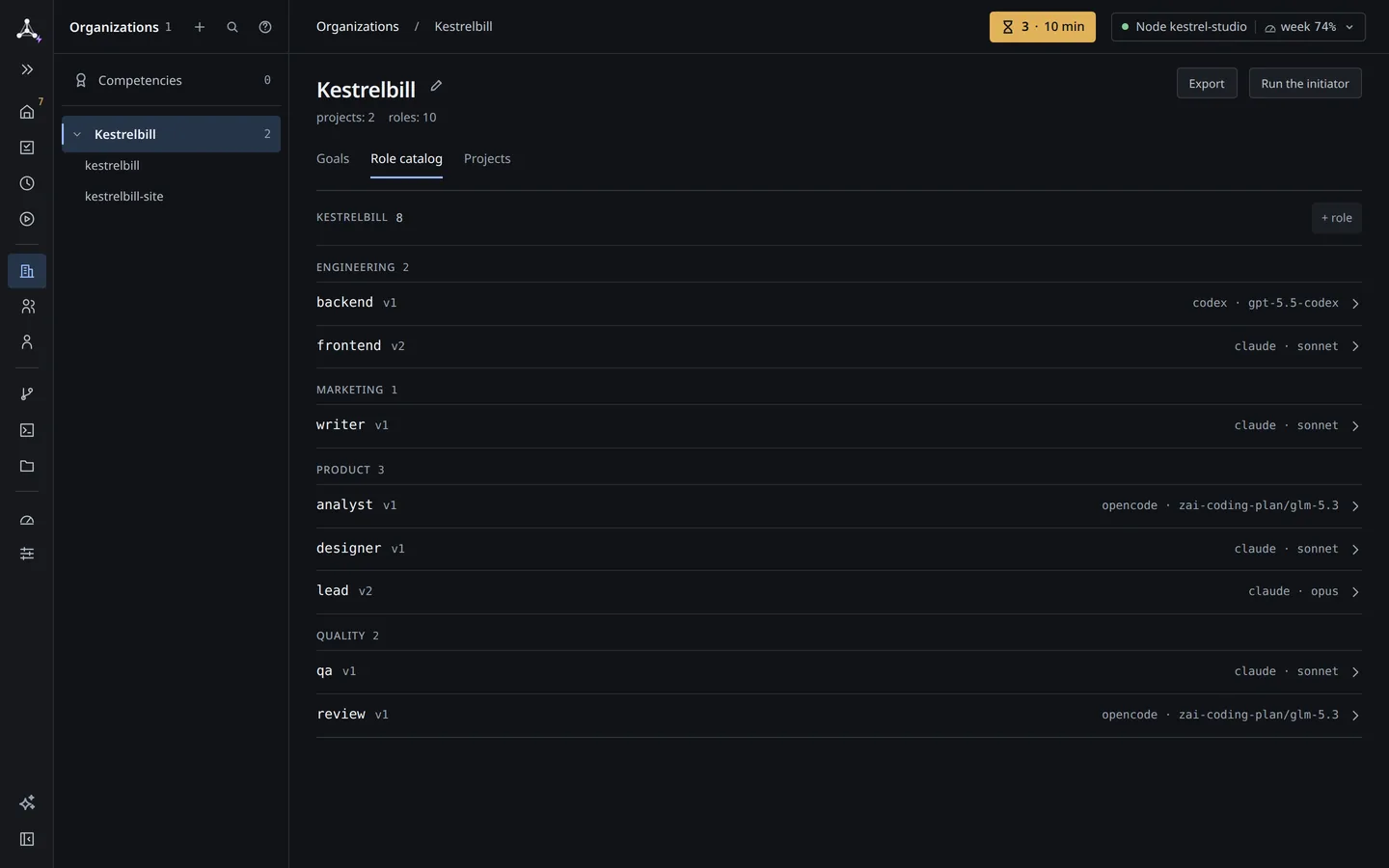
Organizations › Kestrelbill › Role catalog: eight roles in four departments, each with a version, a harness and a model.
Role catalog: roles by department, each with its harness, model and instruction version.See the full screen ↗

Pick the tool for each job.

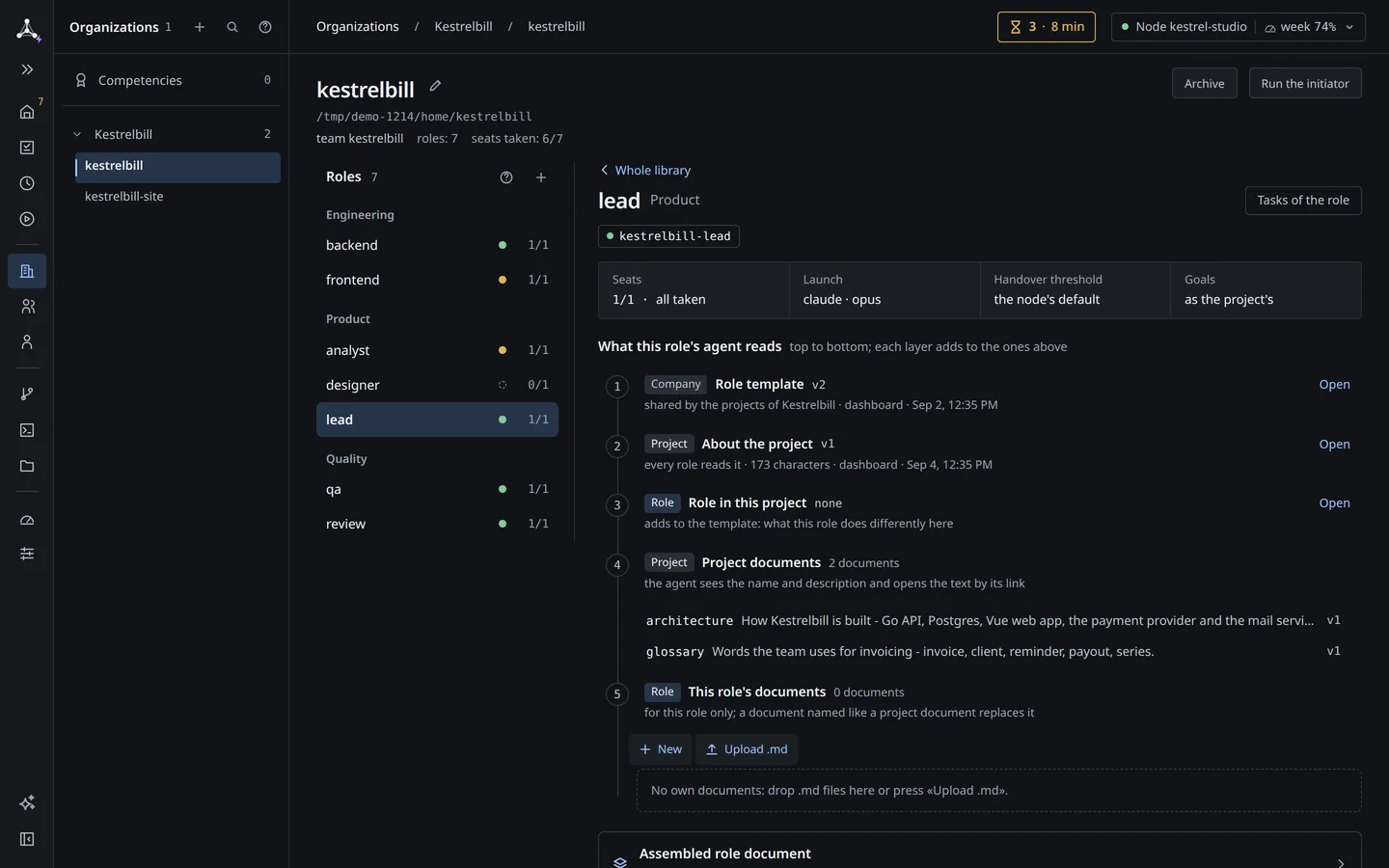
Every role has its own harness (the tool the agent runs in), its own model and its own effort (how hard the model works). Its instructions have versions. Give the careful review to a strong model and the simple labeling to a cheaper one.

  • When you change a role’s instructions, a new version is saved and the holder is told their duties changed.
  • Several subscriptions per harness on one machine, each project picks its default. harnsy Max
The lead role card: seats, launch with claude and opus, the handover threshold, and the five layers of instructions the agent reads.
A role card: harness and model, handover threshold, the instructions the holder reads.See the full screen ↗

A task you can read and judge.

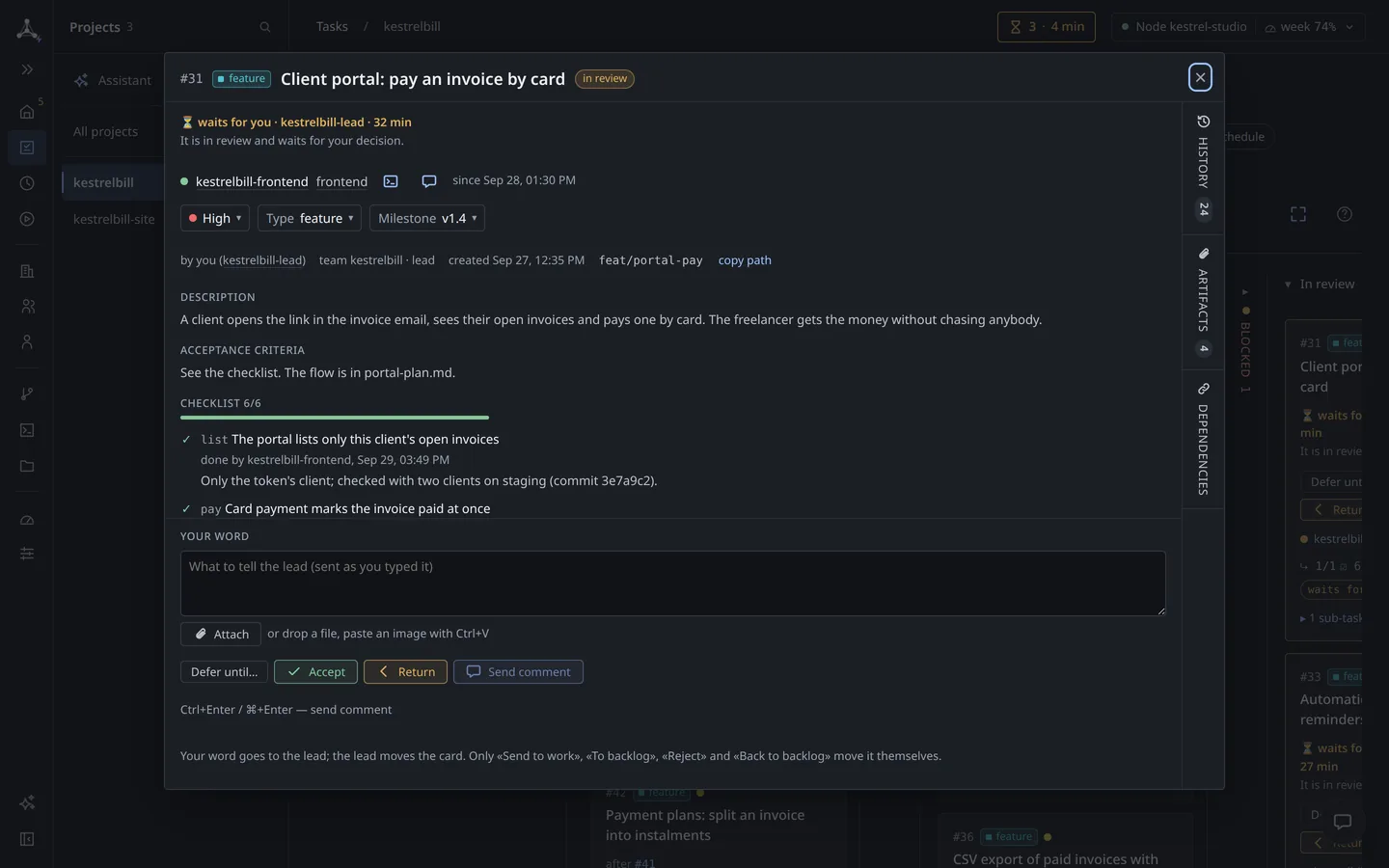
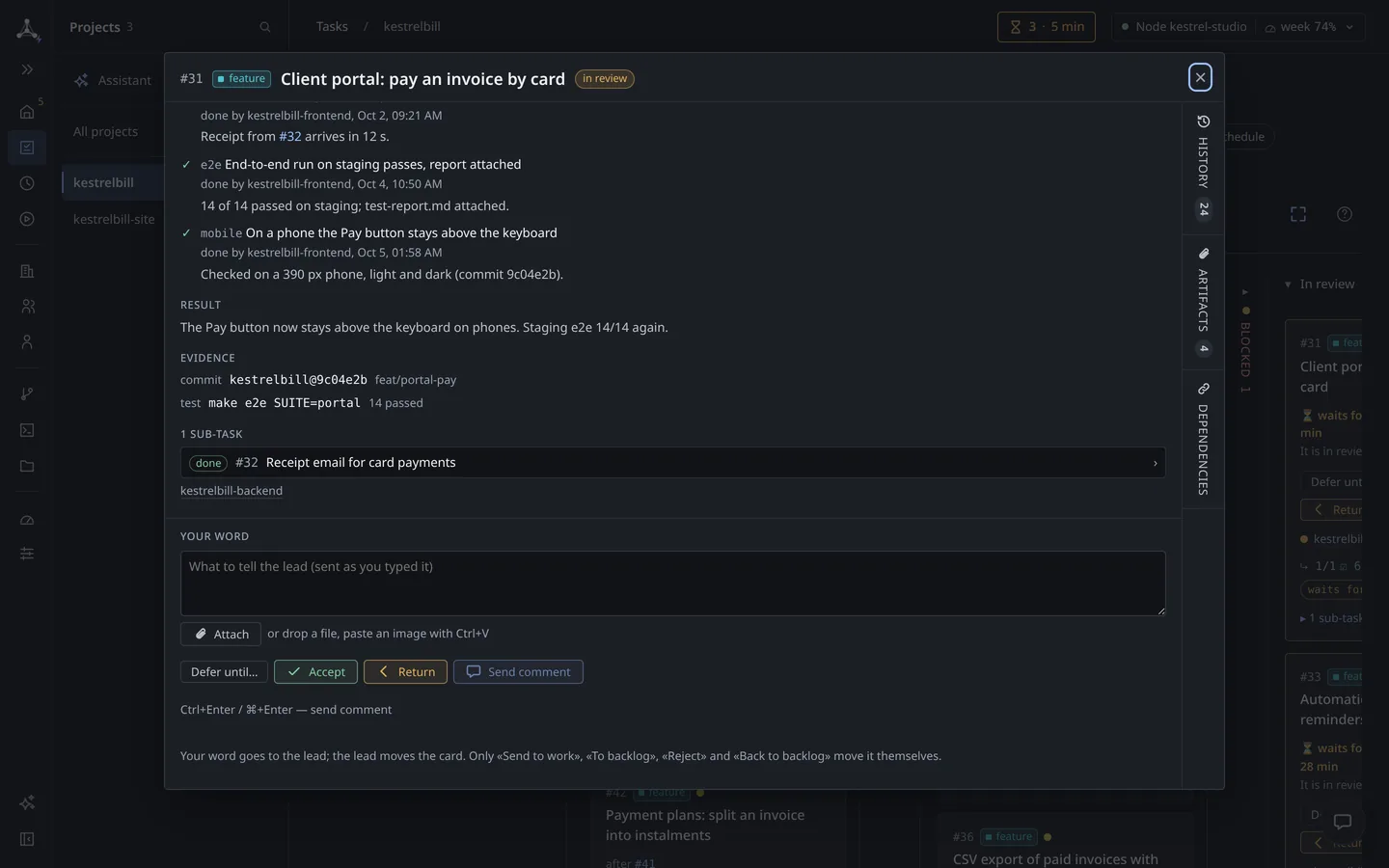
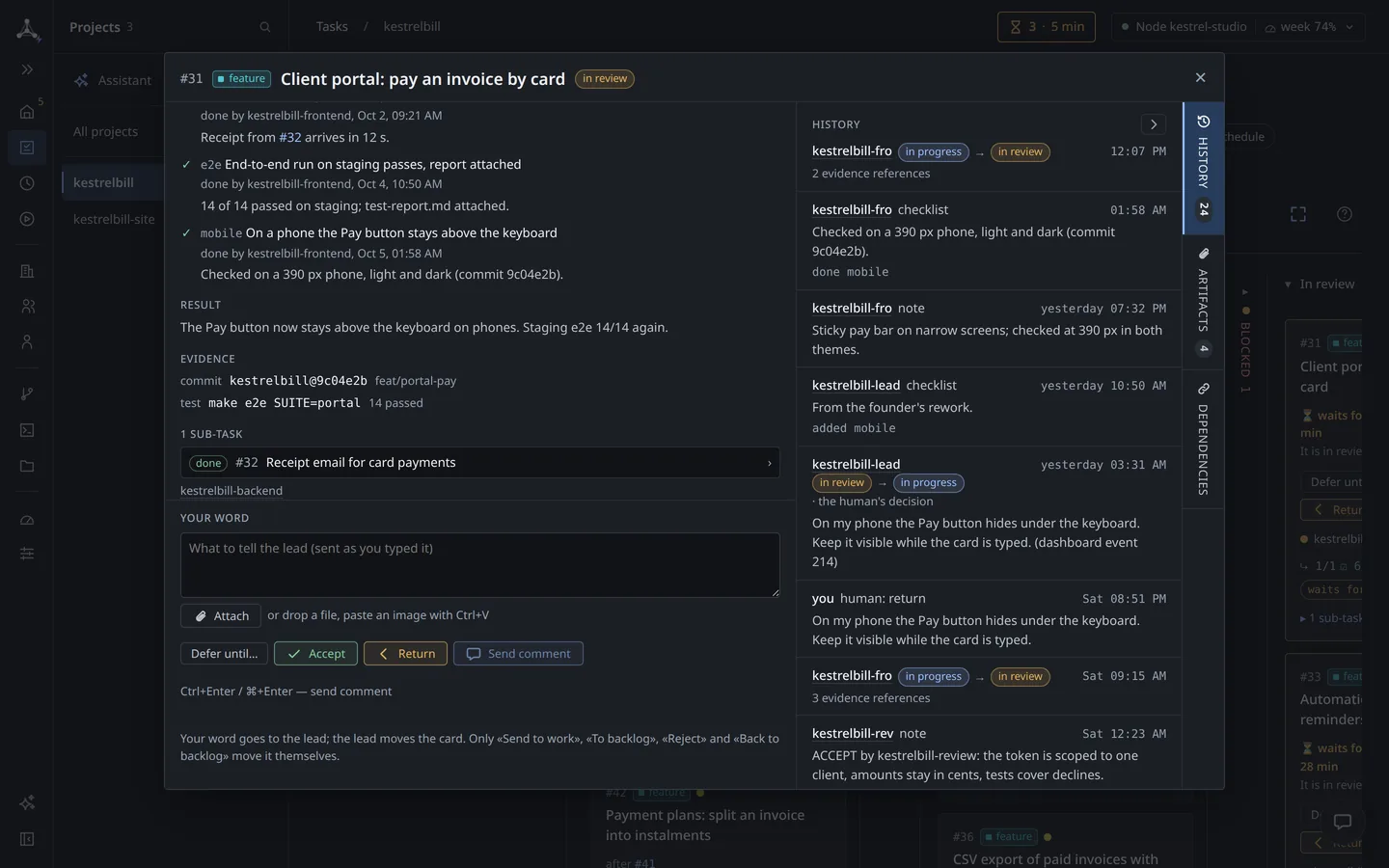
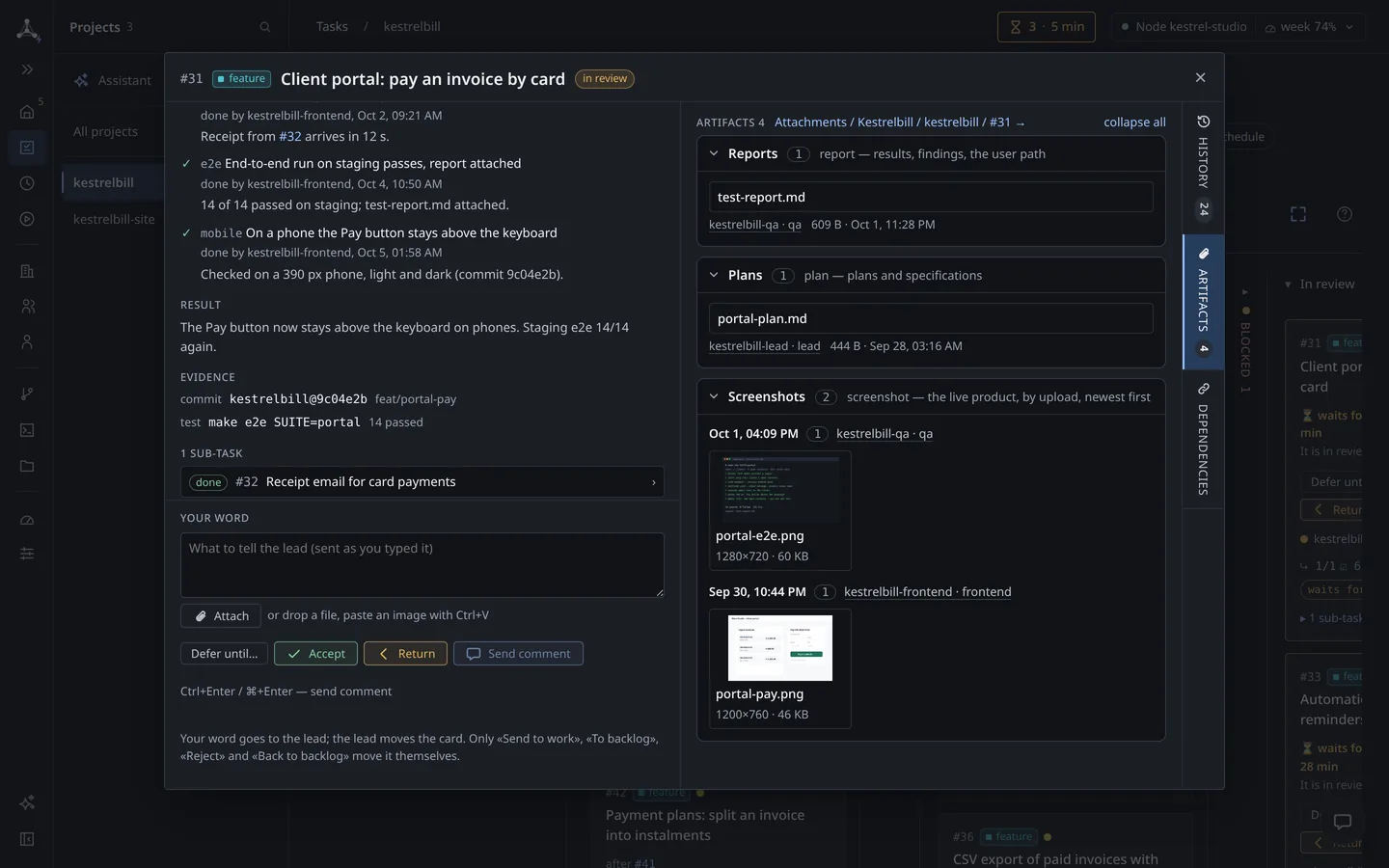
A task card holds what you need to decide: the acceptance criteria, a checklist, documents and screenshots from the agent, and the full history of who moved it where. You accept it, or send it back with a note.

  • The task stays when the agent changes, because it belongs to the role.
  • A task has a state you can read: New, Taken, In progress, In review, Done.

From your words to Accept, in six lines

  1. You tell the lead what you need.
  2. The lead asks you what is unclear, with buttons.
  3. It writes a plan; you accept it.
  4. It splits the plan into tasks, one per role, each with a checklist.
  5. The agents work; a reviewer checks.
  6. The task comes to you in review: Accept, or Return with a note.

See a real one on /teams: a water-supply design team, from the first request to the accepted plan.
Task #31 «Client portal: pay an invoice by card» in review: waits for you, description, acceptance criteria, checklist 6 of 6, Accept and Return.
A task card in review: criteria, checklist, your word, Accept or Return.See the full screen ↗

Handover, so a full memory window does not stop the work.

An agent has a limit on how much it can hold in one session (its context). Each role has a handover threshold that you set. When the holder reaches it, the lead is told. Then:

  1. The holder writes a note: the goal, what it owns, open threads, decisions and why, next steps.
  2. A new agent takes the role, reads the note and confirms.
  3. The old agent stays as a consultant until the lead lets it go.
  • The new agent follows a written note. This is not endless memory: harnsy has no memory feature today.
  • Stop a team and restore it with its sessions.
  • A schedule can start a role’s work at set times, for example a daily report. Since 0.9.0
Handover notebackend · kestrelbillkestrelbill-backend
Goal
Late-payment reminders (#33) and invoice numbering per client series (#35).
Owns
#35, in progress.
Open threads
The lead asked whether a series can restart each year: no answer yet.
Decisions and why
Numbers are taken in the database, not in the app, so each invoice gets its own number.
Next steps
Finish the database change, run the series test, send #35 to review.
  • kestrelbill-backend-2took the role, read the note, confirmed
  • kestrelbill-backendconsultant until the lead lets it go
A handover note: the holder writes it, a new agent reads it and confirms, the old one stays as a consultant.
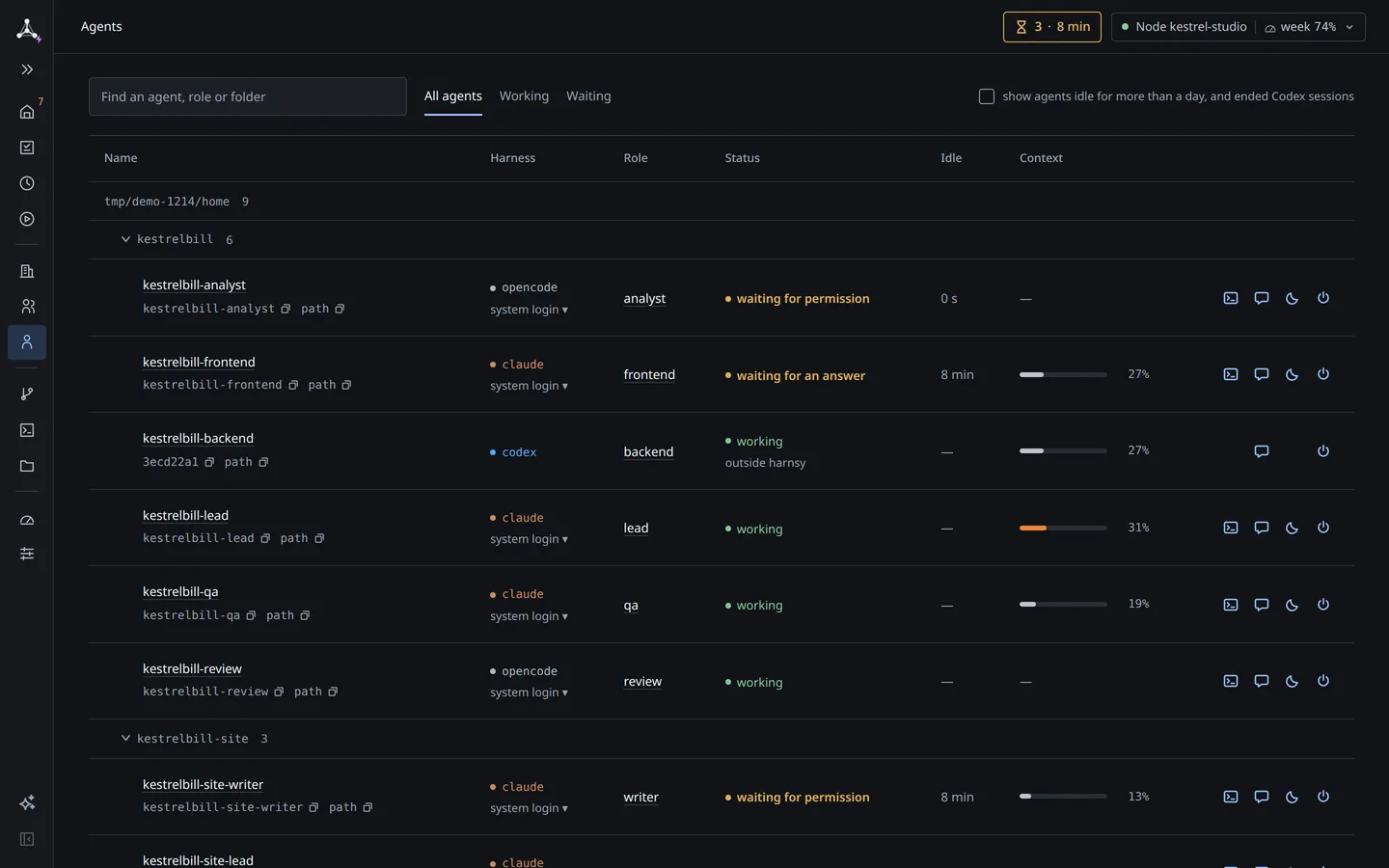
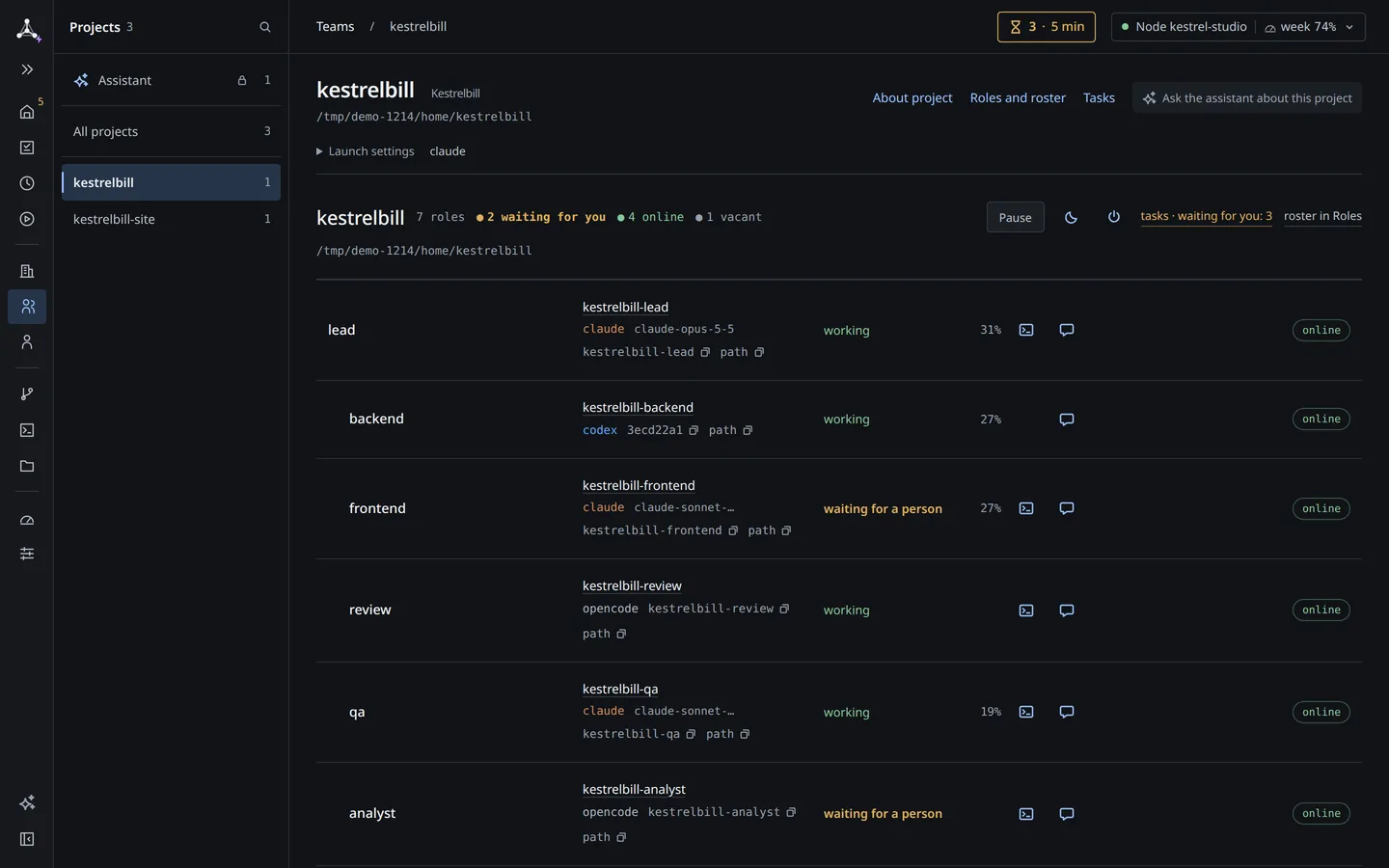
Agents: Claude Code, Codex and OpenCode agents of kestrelbill with role, status and a context bar each.
Agents: who works, who waits, how much context each has left.See the full screen ↗

A worktree for each task, a reviewer before you.

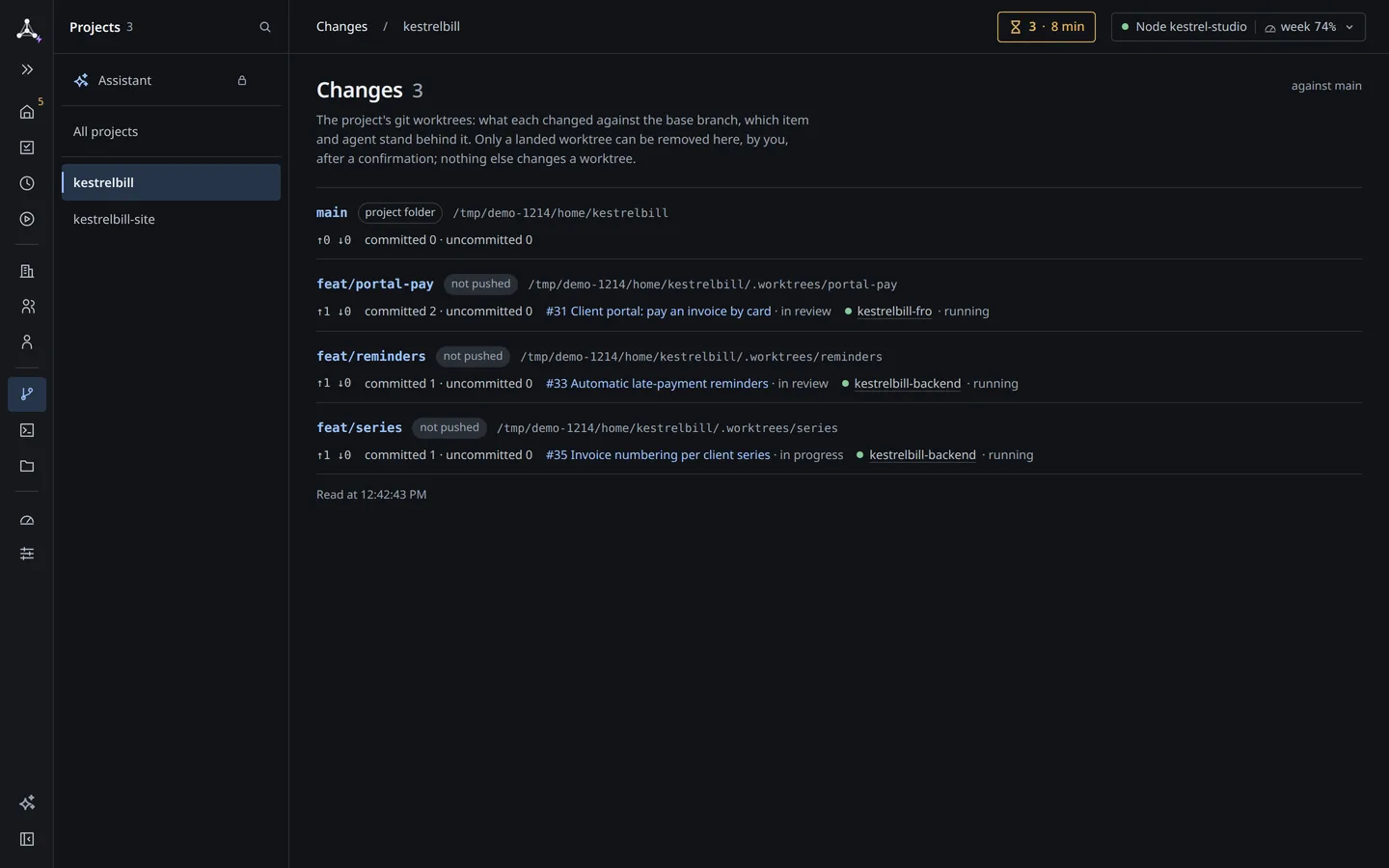
Each task gets its own git worktree. A Changes view shows what every agent edited. A reviewer role checks the work before it reaches you.

  • You see stuck and idle agents without reading the traffic: the lead is told about an idle agent, a stalled task or a holder that is gone.
Changes › kestrelbill: three git worktrees, each linked to its task (#31, #33, #35) and the agent behind it.
Changes: a worktree per task, with its agent.See the full screen ↗

You decide; it shows what waits.

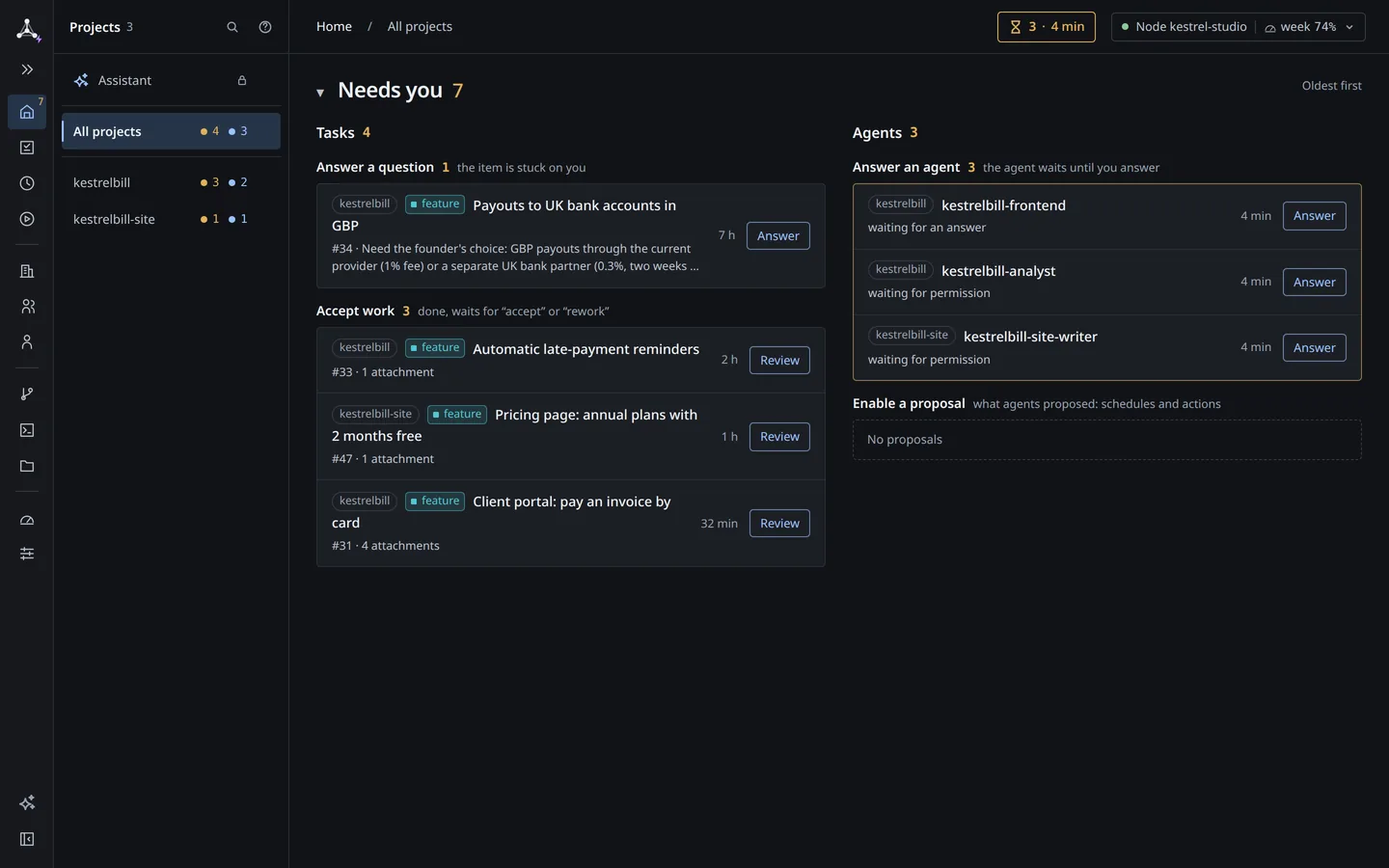
The home screen collects what needs a person: tasks in review (you can snooze them), an agent that asked you a question, a permission request. You see what is stuck without reading the traffic.

  • Amber means waiting for you. Green means working. Red means failed, or nobody holds it. Blue is an action.
  • You open the dashboard when it signals, act, and go back to work.
Home, Needs you 7: a question waits for an answer, three tasks wait to be accepted, three agents wait for an answer or a permission.
Home: what needs a person, in one place.See the full screen ↗

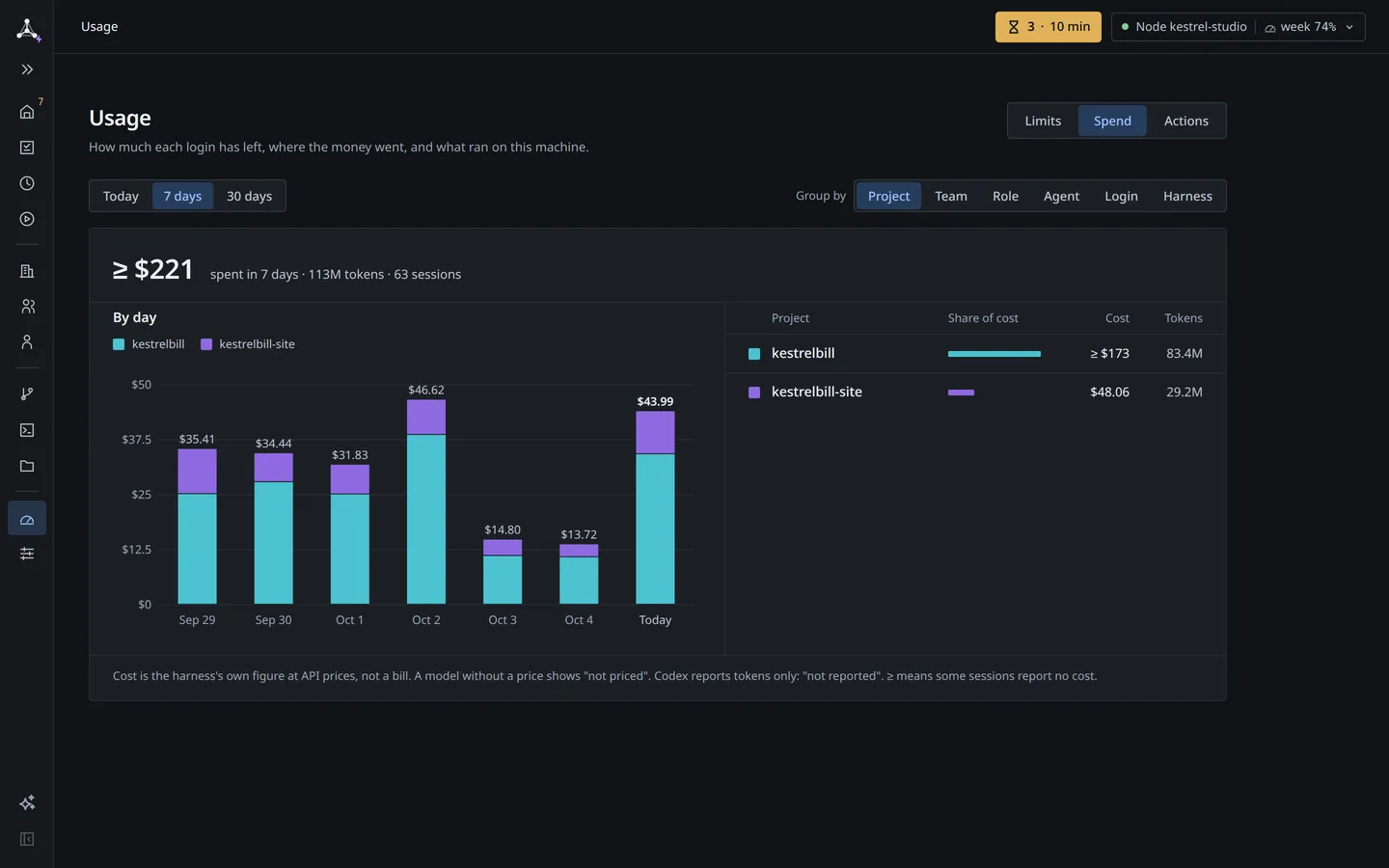
What it costs, by project and role.harnsy Max

Usage shows tokens and cost by project, team, role, agent, harness and day. We have not measured how a team compares with one session, so we do not promise a saving. The page shows what you spend.

Usage › Spend for 7 days, grouped by project: cost per day and each project’s share of cost and tokens.
Spend: cost and tokens by project, team, role, agent, harness and day.See the full screen ↗

Any work that splits into roles.

Ask the lead for a social-media team and it sets up a lead, a strategist, a designer and a copywriter. A real team (anonymized) designs the water supply and sewerage for a residential complex: the same page on /teams shows it. A daily analytics report can run on a schedule. Since 0.9.0

  • Code is the main example, not the limit.
  • You still need one coding agent that you are signed in to.

YouSet up a social-media team for Kestrelbill.

  • Lead
    • Strategist Claude Code
    • Designer Claude Code
    • Copywriter Codex

YouPlan the water-supply and sewerage sections for a residential complex.

  • Lead
    • Chief water-supply and sewerage specialist Claude Code
    • Water-supply and sewerage engineer Claude Code
    • External networks engineer Claude Code
    • and 3 more
a real team, anonymized
Two teams, each started with one request to the lead.

Start with one project.

  1. Paste one line into your agent: «Install harnsy following https://harnsy.dev/llms.txt». It shows its plan first, then installs.
  2. Open the dashboard.
  3. Run the initiator and give it your project folder.
  4. Answer a few questions. Nothing is saved without your yes.

In a few minutes you have a lead and a first team. Already running a project? Ask an agent to read your documents and write a «starting point» note: what exists, what is missing. That is an instruction you give, not an import button.

Install harnsy following https://harnsy.dev/llms.txt
Teams › my-project

The initiator asks: What is this project for, in one sentence?

You An invoicing app for freelancers.

  • leadmy-project-leadworking
  • backendmy-project-backendworking
  • reviewmy-project-reviewworking
One line to your agent, then, in the dashboard: a lead and a first team.

harnsy is closed source and runs on your machine. Where does my data go?

harnsy works without a key. A harnsy Max key turns on several machines, connections and usage. Ask for a harnsy Max key